
1.2 Explanation of Terms
A project based on MaaFramework typically consists of MaaFramework Core, UI, Project Resources, and Agent. Among these, Project Resources define the project's execution logic, Core handles execution, Agent extends custom logic, and UI provides the interaction interface, reading resources and performing operations through the ProjectInterface protocol.
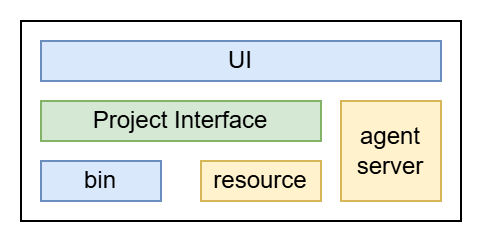
Most of the development based on this project revolves around writing project resources. Simply configure the interface.json file correctly to run it through the General UI provided by the community. Before starting development, make sure you are familiar with the following terms.
MaaFW Terminology
Node
A complete Json Object that conforms to the Pipeline protocol.Task
A logical sequence structure in which several Node are connected in a certain order, representing the entire process from beginning to end.Entry
The first Node in a Task.Pipeline
All Node contained in apipelinefolder.Bundle
A folder stored in a standard resource structure, includingpipeline,model,imageand other folders.Resource
A resource structure in which multiple Bundles are loaded in a certain order.PI
ProjectInterface, A standardized project structure declaration that conforms to the ProjectInterface definition.Agent
💡 MaaFW v4.x version highlights, that it can separate the MaaFW body andCustomRecognition/CustomActioninto two independent processes.
For example, the body runs in a common GUI written in C#, and at the same time runs your own Custom logic in Python code, breaking the language barrier.
General terms
UI
Short for User Interface, referring to the visual layer where users interact with the program.
In the MaaFW project, the UI builds configuration items frominterface.json, then passes resource files to the MaaFW core as needed.Binding
Provides glue code to convert MaaFW's C language interface to other programming languages or operating system services.
Reference to WIKI.ROI
Define the image recognition boundary and perform relevant image processing only within this area.
Reference to WIKI.OCR
Process and recognize images containing text, and extract the contained text and layout information.
Reference to WIKI.